 DocumentFlow Desk
Open the advanced tracking display settings
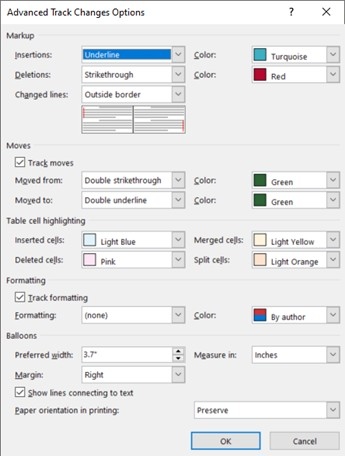
Microsoft describes using the Review tab’s Tracking dialog launcher and Advanced Options to customize revision markup. Insertions, deletions, moved text, and formatting changes have separate display settings. Choosing By author lets Word assign colors to contributors, while a fixed color can make all changes of a particular type look alike. These controls help tailor the review display to the way you read a document.
Do not treat a color as a permanent author identifier
Word chooses the colors used for different authors, and those choices can change when a file is reopened or viewed on another computer. Microsoft also states that these color preferences apply locally: colleagues see their own configured display. Use reviewer names and the actual change information when attribution matters. Changing a color or hiding a category of markup does not accept or reject the underlying tracked revision.





















Comments
0