 DocumentFlow Desk
Select the section whose behavior needs to change
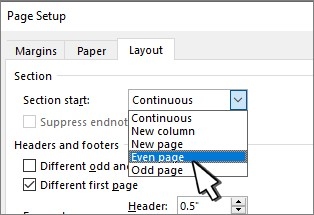
Place the cursor in the relevant section break or section before opening the layout controls. In desktop Word for Windows, use the Page Setup dialog launcher from Layout, then select its Layout tab. The Section start list determines the kind of break used. Choose the intended option and confirm the dialog rather than inserting several new breaks around the same content.
Use the controls available in the desktop application
The Mac route described in the support guidance uses Format, Document, and Layout to reach the section-start setting. Word for the web does not offer the same break-changing capability, so the desktop application is needed for that operation. Check the affected pages after changing the setting, especially where the document already contains headers, footers, or another carefully arranged layout. Editing the existing break keeps the change focused on its intended purpose.





















Comments
0