 DocumentFlow Desk
Choose the update that matches the edit
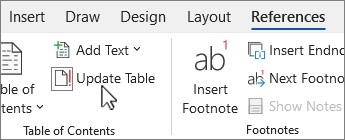
Select Update Table from the References tab when an automatic Word table of contents needs refreshing. Updating page numbers only is useful when the headings remain unchanged but content has moved. Updating the entire table also reflects revised heading text. Choosing the appropriate action keeps the contents page aligned with the actual report rather than leaving readers with outdated navigation.
Check whether the table is automatic
Word cannot regenerate a contents page that was manually typed as ordinary text. That kind of table requires manual corrections, while an automatic table uses the document's headings. This distinction matters when inheriting a report whose contents page merely looks automatic. Confirm how it was created before troubleshooting the update controls, and review both the entries and page numbers after substantial editing so that the final document remains easy to navigate.





















Comments
0