 DocumentFlow Desk
Prepare the material that should repeat
Start with a document whose layout, margins, sections, and styles already suit the recurring task. Remove text and pictures that belong only to one completed example, leaving the instructions, headings, or boilerplate that future documents need. The purpose is to preserve a useful starting structure, not to copy an old project with its accidental details still embedded in the file.
Save the template and create new documents from it
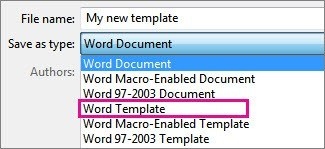
Use Save As and choose the Word Template format, normally a DOTX file. Templates stored in the Custom Office Templates folder can appear under the Personal area when creating a new document. Opening the template as a starting point produces a separate document with the prepared content and settings. Keep the reusable template distinct from finished outputs so that ordinary editing does not gradually overwrite the standard layout.







Comments
0